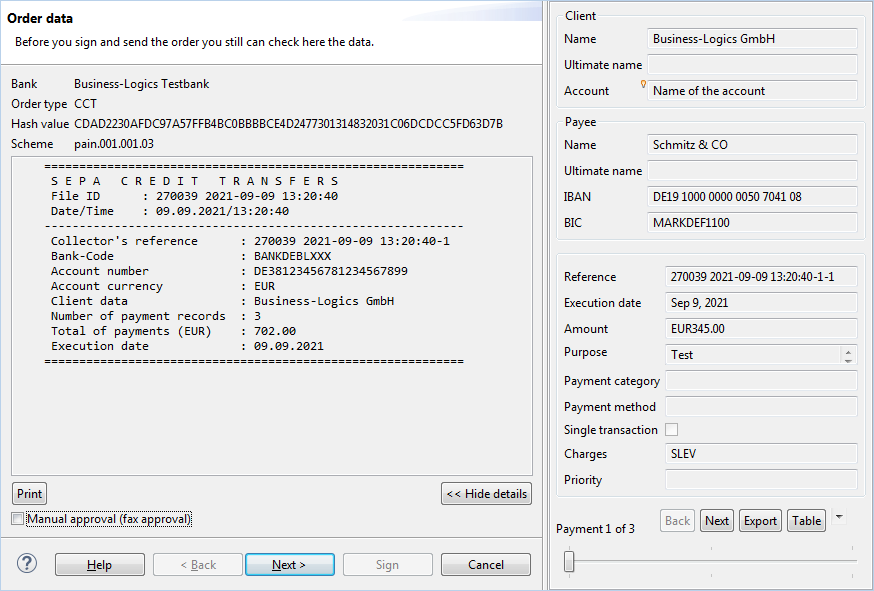
Figure: Order data before submission for verification of payee
As of October 2025, payment service providers based in a SEPA country with euro currency will be subject to a legal obligation. For SEPA transfers and SEPA instant transfers, it must be verified that the name of the payee matches the specified IBAN, which is known as Verification of Payee or VOP for short. This shall reduce errors and prevent payment fraud. The verification of payee (VOP) is based on the data held by the bank of the payee.
The verification of payee (VOP) is coordinated by the EBICS bank server and carried out by the bank of the payee or its service provider. In BL Banking, you initiate the verification of payees. Based on the results, you decide whether to finally approve the payments. If necessary, correct the names of the SEPA payees based on the verification results. The result even provides the correct name as a specific proposal for correction, if the deviation was minor. Corporate customers can choose whether or not a verification of payee shall be carried for bulk payments. For single payments, the verification of payee is generally mandatory. A submission with verification is also called opt-in, without verification opt-out. The EDS process starts for orders with verification of payee after receiving the VOP verification result, without verification it starts when submitting the order to the bank. For orders with verification of payee, an additional signature is therefore required.
In addition to Full and No match between name and IBAN, also referred to as RCVC and RVNM, there is a third status: Close Match (RVMC). In this case, the verification returns the name held by the bank. If verification is not possible for technical or other reasons (RVNA) or if the result is still pending (PDNG), this is also returned as the result.
The difference between no match and close match is determined individually by banks or their payment service providers based on the recommendations of the European Payments Council (EPC). In general, minor spelling variations or typos are considered close matches. An abbreviated part of a name can already be considered a no match.
The verification of payee:
New order types have been introduced in order to integrate the verification of payee into the EBICS procedure and display the results. In a BTF, the Service Option element determines whether the order is executed with or without the verification of payee (VOI or VOO). The EBICS bank server must provide banks and subscribers with the required order types.
SEPA transfer
SEPA instant transfer
VOP Status report (result notification)
Usually, you do not need to prepare anything for verification of payee in BL Banking. You can process payments and send files directly. If necessary, you can change bank settings and user preferences. In any case, it is advisable to review stored recipient data in advance and correct it if necessary based on information provided by the recipient or other official sources. Recipient names shall always be entered unchanged.
Recording payments with and without verification of payee is the same. When selecting a saved recipient, the last VOP result is displayed, if available, which may originate from this or another bank. If this result was a close match (RVMC), the suggested or accepted name is also displayed. A timestamp indicates how recent the data is.
Before signing outstanding payments, you can view the negative results from previous verifications of payees that occurred at the same or another bank. Based on the previous results, you can decide whether you should correct the outstanding payment in advance and submit the order with payee verification. For correction purposes, you can print the tabular overview as a PDF file. The overview is offered by default, but can be skipped or turned off completely.
You can decide whether a new verification should be carried out in the dialog box Sign Payments via the checkbox Verify payees (VOP), which is preset according to the preferences. The order type CTV or CIV or the BTF is displayed accordingly in the header of the order data. If you sign an individual payment and payee verification is enforced according to the bank properties, you cannot deactivate the payee verification.
If you want to correct the payee due to a negative verification result, you must cancel the order in the EDS, save an open payment, correct the payee in the open payment, and resubmit the order.
If you sign several payments jointly, the following applies:
Figure: Order data before submission for verification of payee
The verification of payee also applies to file transfers in the perspective Orders – Sent files with the following distinctions:
As with payments, your signature with verification of payee is only considered a transport signature, while a signature without verification of payee is considered a bank-specific approval. Please note this difference, especially when sending files jointly. Orders with verification of payee must be signed again for bank-specific approval on the Distributed Electronic Signature tab after the VOP results have been received.
If you want to correct payees from a sent file due to a negative verification result, you must cancel the sent file. If no new file is available, you can display the payments contained in BL Banking via the context menu for sent files and save them as open payments. In the perspective Payments – Open payments, you can now edit the payment and resubmit the order with the corrected payee.
If you use saved SEPA recipients for payment recording, you can also correct them for further use based on the VOP results. Open the view Recipients in the perspective Payments and sort by the column VOP result. This contains the result of the last VOP verification for SEPA payees. Please note that no results for payees from directly sent files are displayed here.
You can improve the expected results of future VOP verifications by always entering the exact spelling of payee's names. You can enter internally used abbreviations or alternative names in the field Display name of the recipient data. You can use the field Ultimate recipient when recording a payment.
Notifications containing VOP results for submitted orders are automatically retrieved from the banks via order type VPZ and immediately offered for printing. These are status messages from the bank in pain.001 format. In the perspective Orders, all result notifications are gathered under Notifications. You can open them from the context menu in the original, print them as a PDF file, or view them as a tabular overview via the menu item Display VOP results.
The tabular overview can be opened across banks and for several notifications and can also be printed as such. VOP notifications and VOP results are available in additional views via the context menu, for example under Order – Sent files and in perspective Payments – Signed payments.
You can also make VOP notifications and VOP results available to users of other systems who deliver data but do not themselves receive results from verification of payee.
In the bank properties, you can switch the verification of payee on and off, check user profiles and send parameters for completeness and configure notifications for VOP verifications. The default values can usually be retained. Configure exceptions to avoid rejections, errors and delays in the process. Select a bank under Bank connections and then Properties from the context menu. Click on a heading on the left to edit the corresponding dialog box on the right.
The checkbox Permit verification of payee (VOP) determines whether SEPA payments can be submitted to this bank including a VOP verification. Disable verification of payee if the bank cannot offer it (e.g., for technical reasons) or is not obliged to (e.g., if based in a country outside the eurozone). When verification of payee is enabled, you decide whether verification is actually desired at the moment of submitting a payment. The checkbox Enforce verification of payee (VOP) for single payments can only be edited if the verification of payee is switched on. This determines whether a choice shall also be allowed for single payments (which is not compliant with the specification). Only disable this checkbox if the bank explicitly tolerates single payments without verification of payee. Otherwise, the bank will reject these payments.
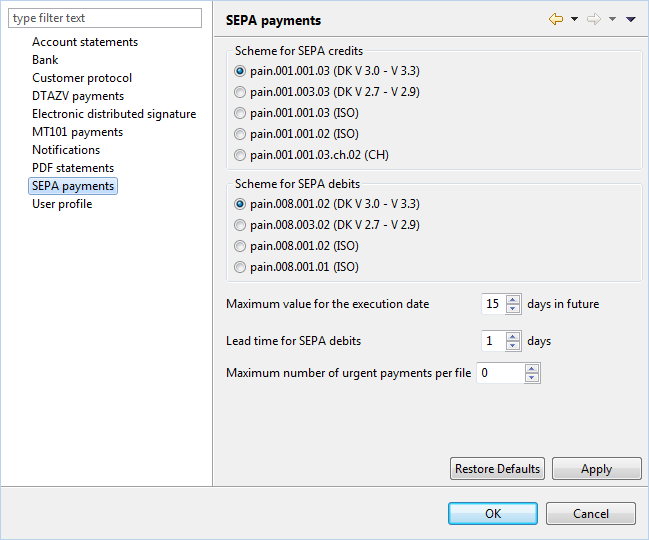
Figure: Enabling verification of payee in the bank properties
The order types CTV, CCT, CIV, CIP and VPZ (or the corresponding BTFs) must be assigned to all users who submit payments to the bank. As an administrator, you can view all user profiles. If something is missing, request the change from the bank. The affected users must then update their bank connection. Users who do not have permission for VOP order types automatically transfer SEPA transfers and instant transfers without requesting a verification of payee. Users who do not have permission for VOP order types automatically transfer SEPA transfers and instant transfers without requesting a verification of payee. Once the user profile provides the missing permissions, the verification of payee can be used.
The order types CTV, CCT, CIV, CIP (or the corresponding BTFs) must be assigned to the SEPA payment types transfer and instant transfer. If the bank uses other order types, BTFs or schemes, change the entry in the respective cell.
Banks provide VOP notifications with the results of the verification of payee for retrieval. These are generated per order for documentation and correction purposes. To retrieve the notifications, the checkbox VOP verifications must be checked in the bank properties and the retrieval order type VPZ must be stored. If the bank uses a different order type, enter it here. Notifications regarding VOP verification results can be opened e.g. as PDF files in the perspective Orders under Notifications and are also included in the transmission report by default. BL Banking gathers the negative VOP results from the notifications and generates a tabular overview from them, which you can open e.g. in the perspective Payments under Signed Payments and in the EDS.
If you do not retrieve VOP notifications, the VOP results are only available when signing in the bank's accompanying ticket, in the order details, and in the perspective Payments for stored recipients.
In the preferences, you can select your preferred settings for verification of payee. Switch the checkbox Verify the payees in SEPA credit transfers (VOP) on or off, as it is used for most of your payments. The checkbox for verification of payee is preset accordingly when signing open payments and sending files. For automatic retrieval, you can specify the interval to receive results as quickly as possible. The other preferences relate to the transmission report, which also contains the VOP results by default, and the display of results from previous verification of payees. Before sending files or submitting payments, BL Banking displays a tabular overview with negative results from previous verification of payee, which can be useful for a preliminary review.
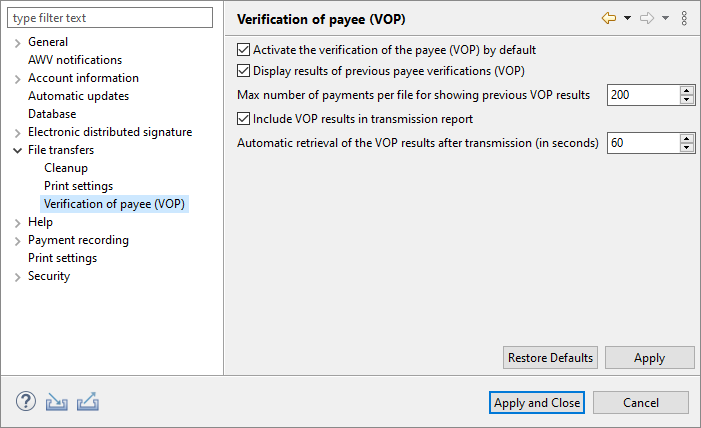
Figure: Preferences – File transfers – Verification of payee (VOP)
Bank properties – SEPA payments
Bank properties – User profile – Order types
Bank properties – Send parameters
Bank properties – Notifications
Preferences – File transfers – Verification of payee (VOP)
Payments – Open payments – Sign payment
Payments – Record recipient – SEPA payee
Orders – File transfers – Sent files –Send file