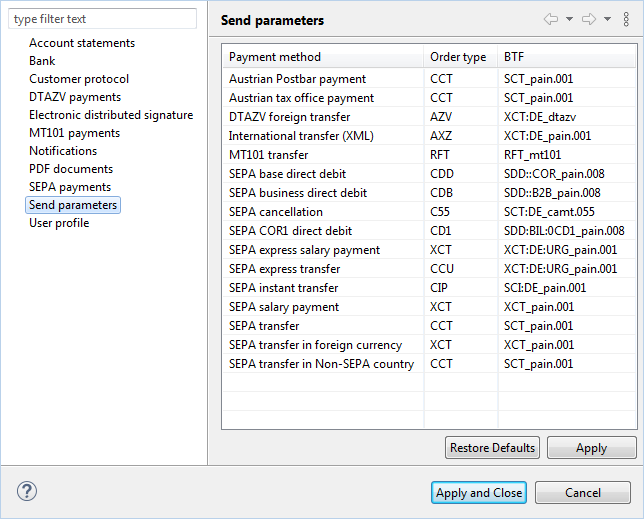
Figure: Settings for the send parameters
Here you can set which BTF or order type is used to send payments to this bank after signing. The lines with the payment types are predefined and cannot be added or deleted. For a bank with EBICS 3.0, the BTF is used; for a bank with the older EBICS version 2.5, the order type is used. To edit a value in a cell, click on it. The value is highlighted and can be edited but not removed. A removed entry is automatically restored on click.
The values are preset according to the country code of the bank, i.e. in accordance with the German, Austrian, or Swiss EBICS specification. For a Swiss bank, for example, the order type XET applies by default for the payment type SEPA transfer and the order type CDD for the payment type SEPA base direct debit. If the bank uses the default values for its country variant, nothing usually needs to be changed. Adjust any deviating values as specified by the bank. If the country code has been changed subsequently under Bank , the corresponding default values will be displayed here. Manually changed values will not be overwritten by changing the country code. To change these to the default values of the selected EBICS country variant, click on the button Restore default values below.
The respective second column for order types and BTFs is only filled if there can be a variant with verification of payee (VOP), i.e. for SEPA transfers and instant transfers, including the variants for salary payments. For all other payment types, this column is empty and cannot be edited.
The format version to be used for SEPA transfers and direct debits is entered in the column Schema. The schemas with an additional version number, e.g. (DK V 3.0 - V 3.6), refer to the SEPA formats issued by the German Banking Industry Committee (Die Deutsche Kreditwirtschaft) and used by German banks. BL Banking supports XML formats in accordance with ISO 20022, which can be recognized by the version number pain.00X.001.XX. These are used by French banks, for example. If necessary, change the predefined schema by clicking into the cell, opening a drop-down list at the end and selecting the desired entry. For schemas, it is not possible to overwrite the entry as with order type and BTF.
The send parameters have an effect when a payment is imported or entered manually and then sent to the bank. If a payment is sent directly as an external file, the format of the file remains unchanged.
Figure: Settings for the send parameters