Notifications

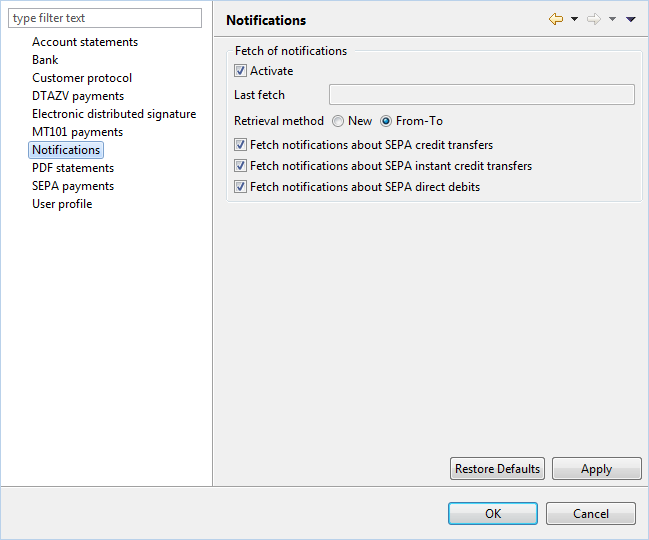
Activate

You can generally turn the retrieval of notifications on and off with this checkbox. For instance, when your bank does not provide notifications, you can deactivate access and thus avoid error messages during downloads of notifications.

Last fetch

For each retrieval of notifications the date of the fetch is entered here. By setting a date of the past you can retrieve the notifications again.

Retrieval method

Basically, banks provide notifications per customer. If a user of a customer has retrieved the notifications from the provision (New), they are deleted there and cannot be retrieved anymore by another user of the same customer. If you are running BL Banking with several users in single-user installations, you should set From-To in this field in all installations. Each installation of this customer then requests the notifications from the date of the last fetch (see above field) at the bank. The notifications are then available in all single-user installations.

Fetch of notifications

For various payment types, banks can provide status reports in pain.002 format or, in the case of recalls, in camt.029 format. A notification provides information about the execution of the order or about errors or rejections. Here you determine which of the possible notifications are actually retrieved by the bank. Uncheck the box if the bank does not provide notifications for a payment type or if you do not need them. The order type or BTF according to the EBICS version of this bank is entered in the input field. If the bank uses a different order type or other BTF parameters, change the field entry accordingly. The default values for retrieving the notifications are:

Notifications for VOP verifications do not provide information about an order status, but contain the result of the verification of payee (VOP) of SEPA transfers and instant transfers. VOP results are necessary in order to be able to sign the verified orders bank-specifically. If you do not submit any SEPA transfers or instant transfers with verification of payee to the bank or if the bank does not carry out any verification of payee, you can switch off the corresponding notifications.

The notifications configured here can be viewed in perspective Orders under Notifications.