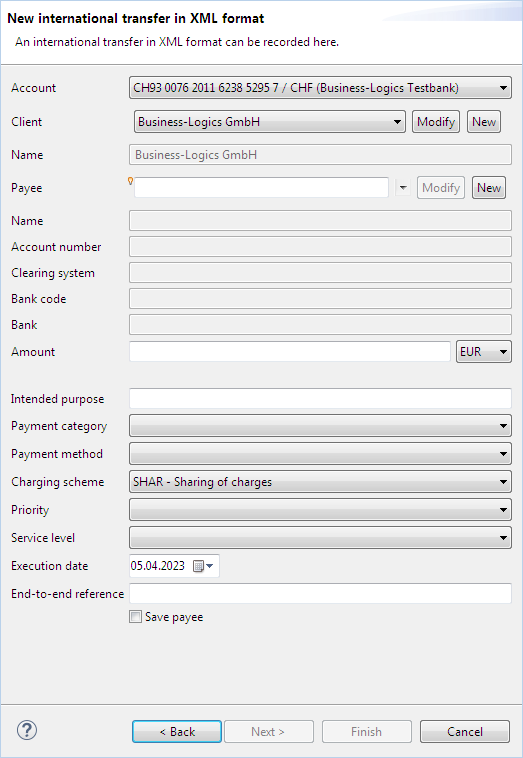
Figure: Dialog box for entering an international transfer
The international transfer is based on the ISO 20022 standard, which allows payments to be made worldwide in XML format. In contrast to the international transfer in DTAZV format, no German client account is required here. In order to use the international transfer, your bank must grant you authorization for the order type AXZ.
When recording the international transfer, most fields are identical to the SEPA transfer. There are differences between the client, payee and amount. A payment method cannot be recorded here, but a charging scheme and a service level can be selected.
For entering this data, drop-down lists are available. For the client, the data is the same as for the SEPA transfer and is recorded using the dialog box SEPA originator. For the payee, on the other hand, there is a separate entry, which contains not only the bank details, but also the addresses of the payee and the bank. The data is entered via the window Payee for international transfers. For both drop-down lists, you can use the buttons Modify and New to edit existing clients and payees during payment recording or create new ones. For the international transfer, there is no ultimate client or payee, as there are for the SEPA transfer.
In the recipient administration, you can also enter the name and address of the bank. If you have entered an address for the payee and the bank there, this will appear as a tooltip here, when you hover the mouse over the small lamp at the fields Name or Bank.
Enter the desired amount for the payment currency here. Then select the payment currency from the drop-down list to the right of the field. BL Banking automatically displays the corresponding value in EUR, provided the average exchange for this currency is listed in the daily fixing of the European Central Bank (ECB). The rates are automatically updated upon each application start. This requires an Internet connection.
Here, you can determine who will pay the fees for the international transfer.
Here you can select an agreement or a rule, under which the payment shall be processed.
Figure: Dialog box for entering an international transfer